
Google has a handy feature that lets you tell its algorithm exactly which news outlets you want to see, and adding DutchReview takes about 30 seconds.
If you’ve ever searched for news about the Netherlands and been served a wall of Dutch-language results you can’t read, there’s a fix for that.
Google’s Preferred Sources tool lets you choose which publications appear more often in the “Top Stories” section of your search results.
Once you add an outlet, Google will surface it more frequently whenever you search for a relevant topic.
Here’s how to get it set up:
Use a direct link
The fastest option, using a direct link, takes you straight to the right page.

You’ll need to be signed into your Google account, and from there, it’s a single tick of a checkbox. That’s it.
Do it via Google Search
Prefer to go the manual route? You can also set preferred sources directly from a search results page.
Search for any news topic or for, for example, “news from the Netherlands”.
When the “Top Stories” section appears, click the small icon next to the heading. A box will pop up where you can search by outlet name.
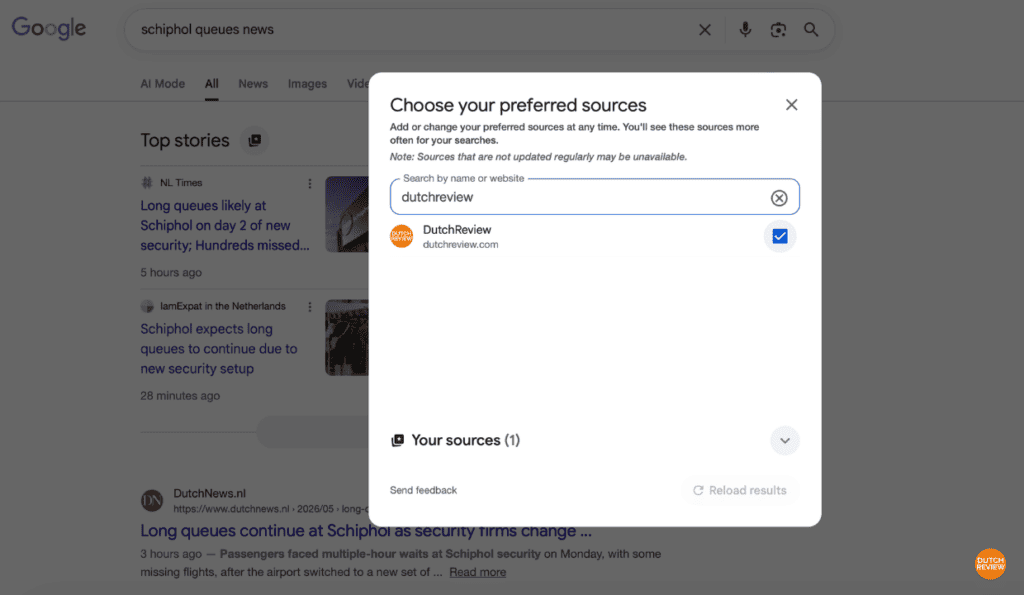
Type in “DutchReview,” select it, and the page will update with your new preferences. Your preferences save to your Google account, so they’ll apply across all your devices.
Will I still be able to see other sources?
Absolutely! You’ll still see relevant articles from other outlets. All this function does is tip the scales in favour of your chosen sources whenever Google is deciding what to show you.

For internationals looking for Dutch news in English, that small tweak can make a real difference to the usefulness of your daily searches.
You can update or remove your choices at any time via the same settings page.
Want DutchReview in your inbox too? Sign up for our newsletter for a regular roundup of what’s happening in the Netherlands — no algorithm required.